



If you’re new to Anki, figuring out how to actually “do Anki” for USMLE prep can be surprisingly confusing. When I first downloaded the program in medical school, I wasn’t sure where to start. And when I looked for tutorials, many focused on add-ons, custom settings, and advanced features that made Anki feel even more complicated.
Eventually, I developed a much simpler approach. You don’t need to master every Anki feature to start using it effectively. You just need to understand the basic tools and how to work them into your study routine.
That’s what this guide will walk you through. I’ll cover the Anki fundamentals you need to get started, from creating your first flashcards to using them to study medical school material, without getting bogged down in complicated add-ons or heavily customized settings.
Download our free Anatomy Anki deck for MS1s with 4,000+ flashcards. Learn body structures with main, labeled, and quiz cards. Created by the nation's leading USMLE tutor, Dr. Jeanie Gribben.
How Does Anki Work? Spaced Repetition Explained
A bit of background: Anki is a flashcard software where you can create your own cards or download pre-made decks to learn various subjects, from languages to medical school content.
Anki uses spaced repetition, a research-supported method for improving long-term retention by scheduling reviews at increasing intervals based on how well you remember the material.
Spaced repetition is based on the spacing effect, a phenomenon discovered by psychologist Hermann Ebbinghaus, which describes how reviewing information at intervals over time can improve retention compared with cramming.
When you review a flashcard, Anki asks you to indicate how well you recalled the information by choosing Again, Hard, Good, or Easy. Your response helps determine when the card will appear again, so material you struggle with is generally reviewed sooner than material you recall easily.
In this way, you are “forced” to actually review specific material that you might not feel confident with instead of letting it sit forgotten in a notebook.
Set Up Anki for Medical School Success
Setting up Anki might seem daunting at first, but it’s actually quite straightforward. Here’s a step-by-step guide to get you started:
- Search for Anki Download: Go to your preferred search engine and type "Anki download."
- Select the Appropriate Version: Choose the version compatible with your operating system (Windows, Mac, Linux).
- Download and Install: Follow the prompts to download and install the software on your computer.
- Get the Mobile App: For studying on the go, download the Anki mobile app from your app store.
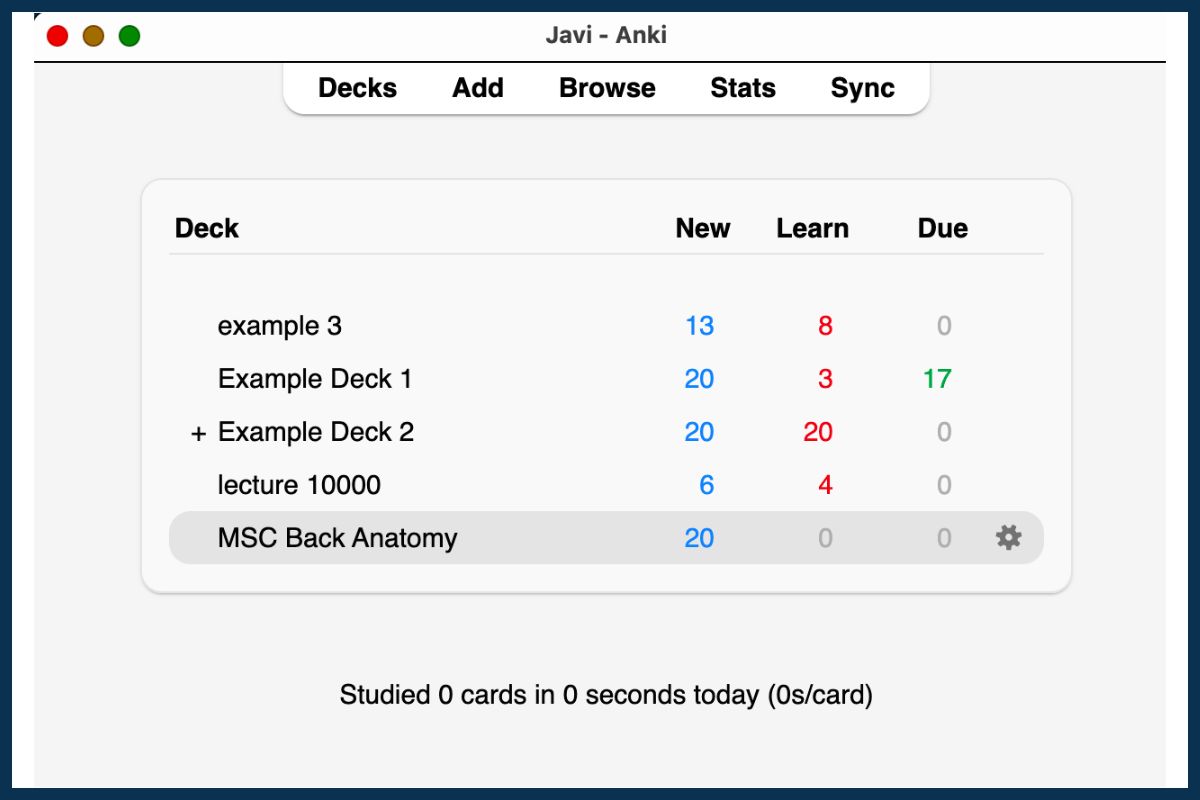
Once you have Anki installed, you’re ready to start creating flashcards. This guide focuses on three types: Basic Front-and-Back, Image Occlusion, and Cloze Deletion cards.
Anki Flashcard Types to Get You Started
Anki offers several types of flashcards, but three are especially useful for medical school:
- Basic Front-and-Back cards work well for straightforward questions, definitions, and facts.
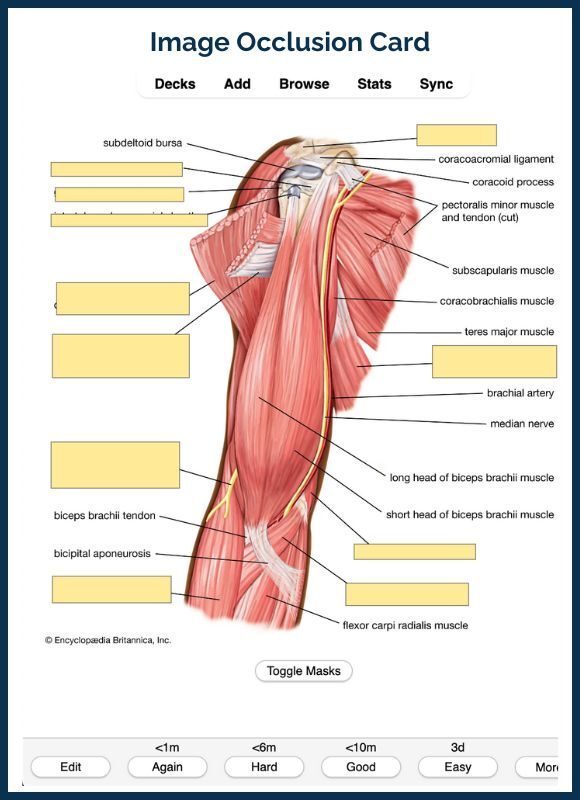
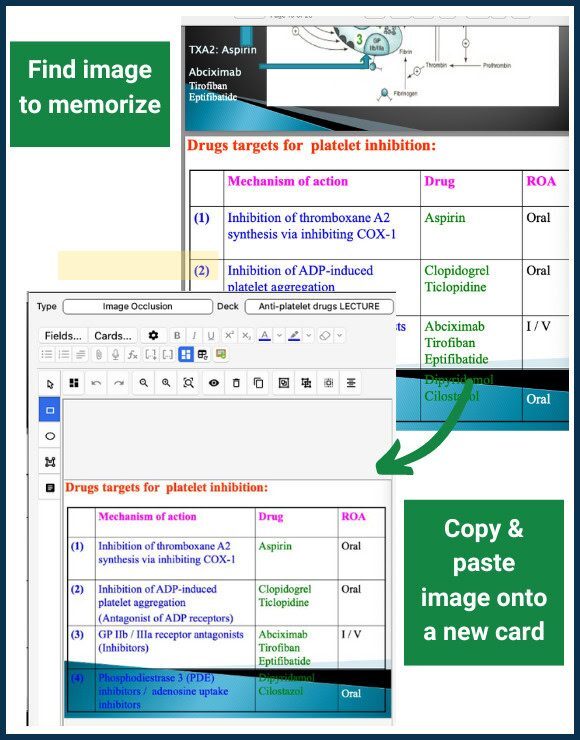
- Image Occlusion cards allow you to hide labels or sections of an image, making them especially helpful for diagrams, anatomy, tables, and other visual material.
- Cloze deletion cards hide selected words or phrases within a sentence, making them useful for recalling key details while keeping the surrounding context.
Below, I’ll walk you through how to create and use each of these card types.
Create Basic Front-and-Back Cards
These are the simplest type of flashcards and are great for straightforward question-and-answer formats.
Here’s how to create Basic Front-and-Back cards:
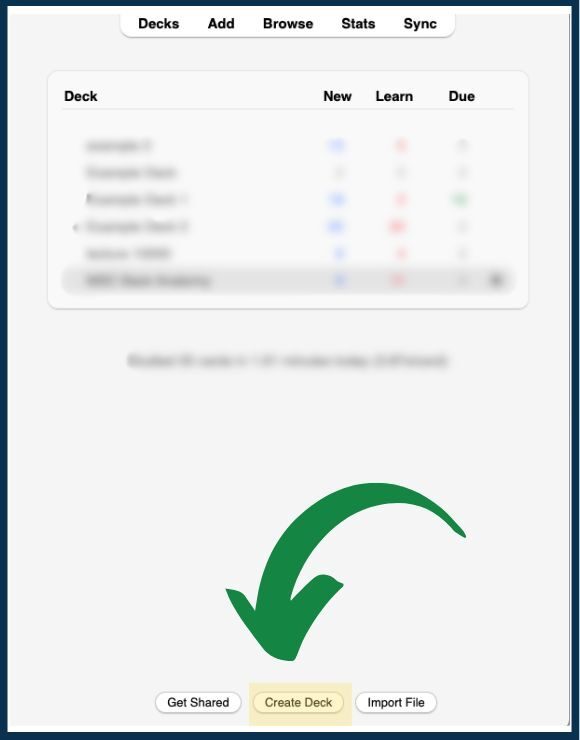
- Create a Deck. Open Anki and click "Create Deck". Then name your deck (e.g. "Example Deck").
- Add Cards. First, click "Add to create new cards", selecting "Basic" for the card type. Then, enter the question of the front and the answer on the back. Click "Add" again to save the card.
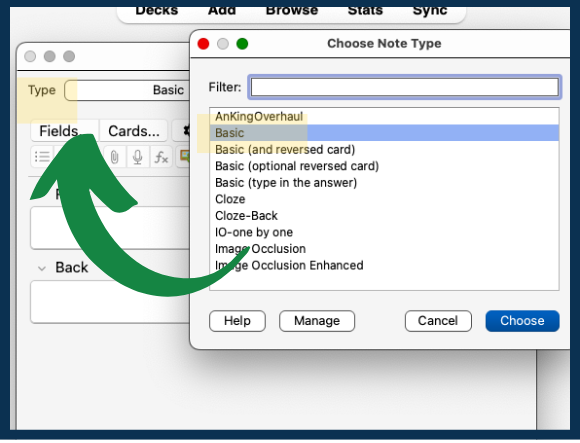
Above is an example of what you can put on a Basic Front-and-Back card:
- Front: What is the mechanism of action of aspirin?
- Back: It inhibits COX-1 and COX-2, reducing prostaglandin and thromboxane production.
Once you’ve added a few cards, you can start studying them by clicking "Study Now".
Create Image Occlusion Cards
These cards are particularly useful for memorizing diagrams, tables, or any visual information. You can use Anki’s Image Occlusion functionality to quickly create multiple cards from this content, rather than wasting your time rewriting or redrawing it.
Here’s how to create Image Occlusion cards:
- Copy an Image: Find an image (e.g. a labeled anatomy diagram) and copy it.
- Add Image Occlusion Cards: Go to your deck and click "Add Cards". Then select the "Image Occlusion" card type and paste the image from the clipboard.
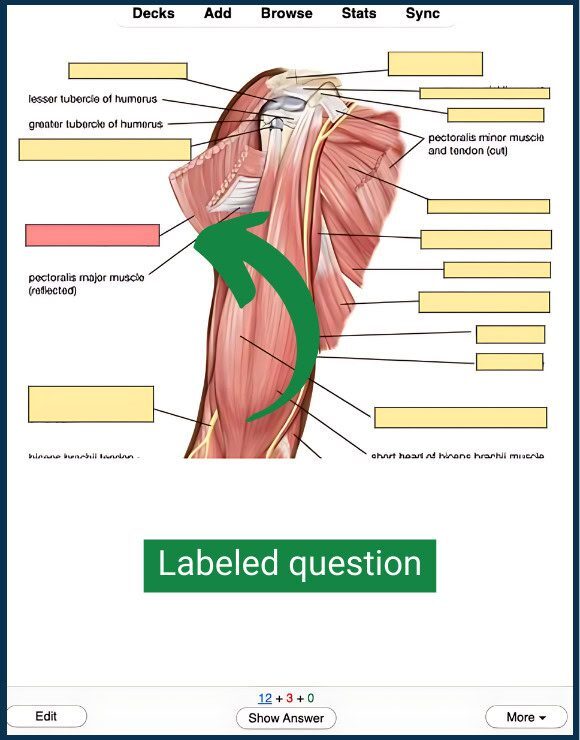
- Hide Labels: Use the "Hide All, Guess One" option to mask the necessary parts of the image. Each mask/label will create a new card.
- Save the Card: Click "Add" to save your new Image Occlusion cards.
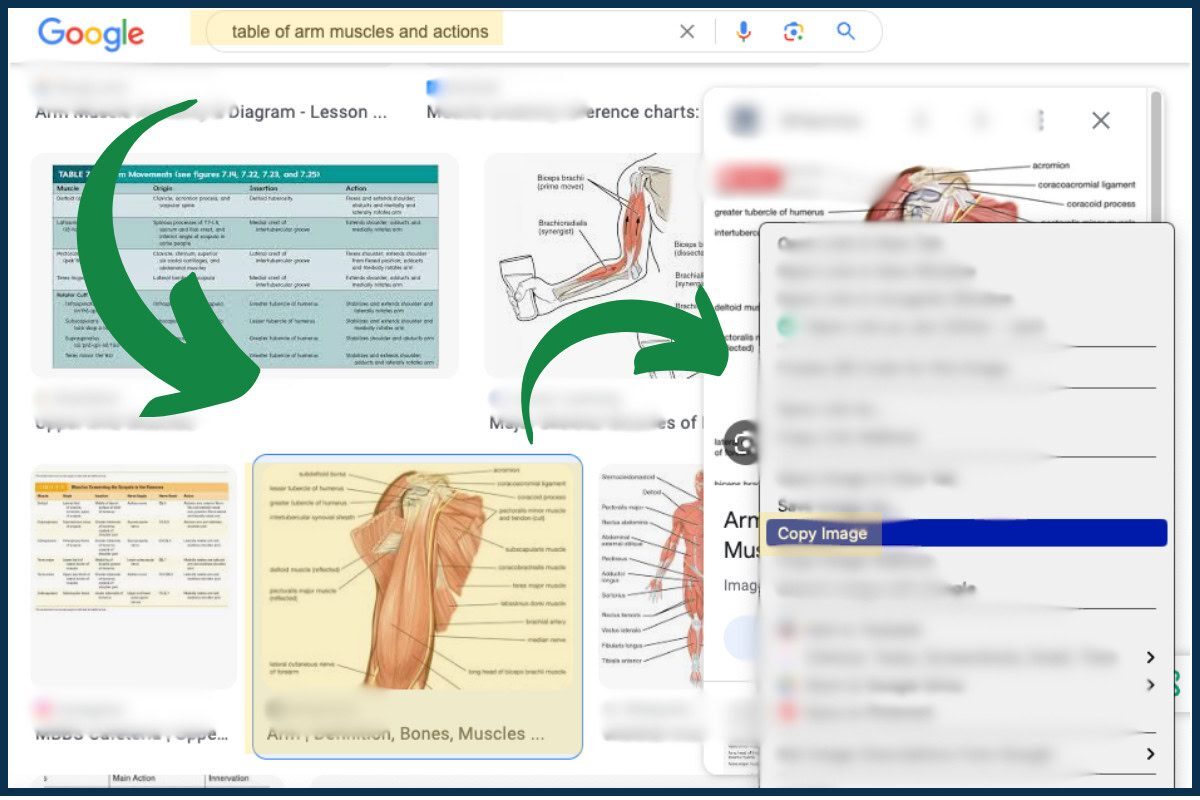
Image Occlusion Example:
- If you have a diagram of the arm, you can create cards that hide each of the labels identifying the different parts of the arm. When you go to study, each card will ask you to identify one of the labels while hiding the others. By working through the cards, you can memorize each label and which part of the arm it points to.
Create Cloze Deletion Cards
Cloze deletion cards ask you to recall a missing word or phrase within a larger piece of information. They can be especially useful when you want to memorize terminology, relationships, or key details while keeping some context visible.
For example, instead of creating a Basic card that asks, “What is the primary site of ATP production in a cell?” you could create a Cloze card that reads:
“Most ATP production takes place in the mitochondria.”
You would then select “mitochondria” and create a Cloze deletion. When you review the card, Anki hides that term and asks you to recall what belongs in the blank.
To create a Cloze card:
- Select Cloze as the note type.
- Type the sentence or information you want to study.
- Highlight the word or phrase you want Anki to hide.
- Select the Cloze deletion button to turn the highlighted text into a blank.
- Add the card to your deck.
Integrate Anki Into Your Study Routine
Once you’ve created your first flashcards, the next step is figuring out how to use Anki alongside your medical school coursework.
You can integrate Anki into your study routine in two practical ways: creating cards from your lecture material and using flashcards to practice recalling information in a question-and-answer format. Both approaches can help reinforce what you’re learning in class and make review more active.
Memorize Lecture Materials Using Anki
Lecture material is crucial, especially if you go to a school that ranks its students. Here’s how to effectively use Anki to memorize lecture content:
- Watch Lectures and Take Notes: Use a tablet or iPad to take detailed notes during your lectures. After your lectures, review your notes to understand the material thoroughly.
- Create a Deck Specific to Each Lecture: Open Anki and click "Create Deck." Name the deck based on your lecture (e.g. "Anti-platelet drugs lecture").
- Add Front-and-Back Cards Based on Lecture Content: First click on your deck and select "Add." Choose "Basic" for the card type. Next, write a question based on your lecture notes. Take a screenshot of the relevant information from the lecture slides and paste it on the back of your card. Save the card by clicking "Add."
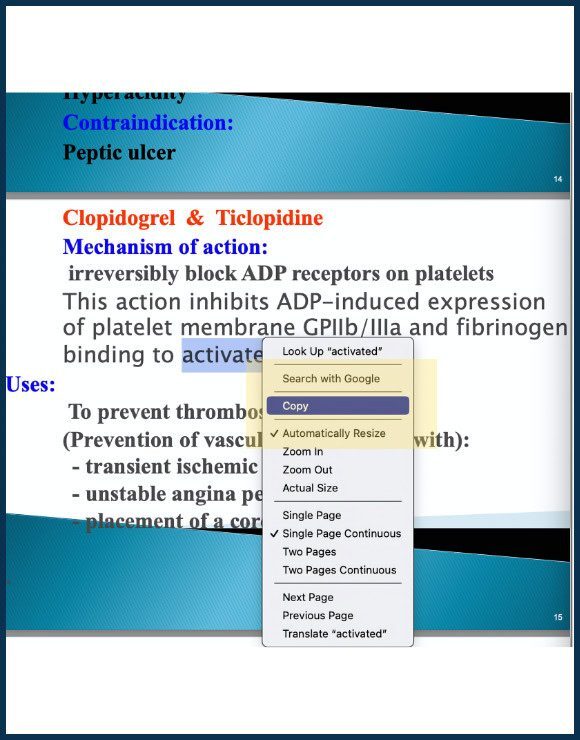
- Create Image Occlusion Cards Using Lecture Slides. Find an image from the lecture slides (e.g., a medication table) and copy it onto your clipboard. Then, go to your deck and click "Add Cards". Select the "Image Occlusion" card type and paste the lecture image from the clipboard. Next, label the relevant parts of the image using the "Hide All, Guess One" option. (One card will be produced per label.) Finally, save your Image Occlusion cards by clicking "Add".
Make Practice Test Questions Out of Lecture Material
Creating your own test questions is one of the best ways to study the content covered in medical school. Not only can it help you memorize the material, the very act of writing the question also helps you understand the information.
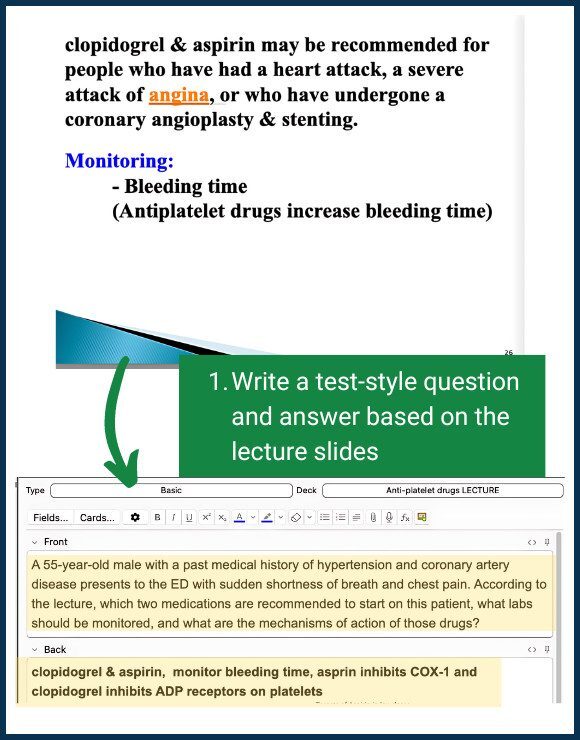
Luckily, Anki makes it easy to create and review practice test questions. Here’s an example Anki card that simulates a test question:
- Front: A 55-year-old male with a past medical history of hypertension and coronary artery disease presents to the ED with sudden shortness of breath and chest pain. According to the lecture, which two medications are recommended to start on this patient and what labs should be monitored?
- Back: Clopidogrel and aspirin; monitor CBC and platelet count.
As a bonus, you can also paste any relevant slides from lecture on the back of the card. Before answering the card, take a minute to try to recall the information from these slides (e.g. the mechanisms of action of clopidogrel and aspirin). This will help you build mental connections between topics.
Here’s an example below of how you can make practice question Anki cards from medical school lectures:
Download our free Anatomy Anki deck for MS1s with 4,000+ flashcards. Learn body structures with main, labeled, and quiz cards. Created by the nation's leading USMLE tutor, Dr. Jeanie Gribben.
Go Beyond Anki & Ace Med School With 1-on-1 Tutoring
Med school is hard, but tools like Anki can make the journey way more manageable. The goal of this guide was to provide you with a solid foundation to start using Anki effectively.
That being said, there's always more to learn and ways to optimize your study habits, and we’re here to help you every step of the way.
If you think you need personalized support to succeed in medical school, check out our 1-on-1 medical school tutoring. All MedSchoolCoach tutors are 90th+ percentile USMLE scorers.
 Jeanie Gribben, MD
Dr. Gribben is a graduate of the Icahn School of Medicine at Mount Sinai and a Merrill Presidential Scholar from Cornell University. She offers tutoring for Steps 1 and 2 and med school coursework, as well as advising support for medical students. She’s dedicated to personalized teaching strategies for student success.